Back to website
Login
Home
Login
Register
Back to website
There was a problem loading the comments.
How to Change Language of your cPanel?
Support Portal
»
Knowledgebase
» Viewing Article
Print
06/19/2019 6:03 AM
cPanel - Control Panel
cPanel supports a lot of languages, and if you want to change your cPanel language to your native language, you should follow this tutorial.
1.
Log into your cPanel account.
2.
In the "
Preferences
" section, click on "
Change Language
" Icon.
3.
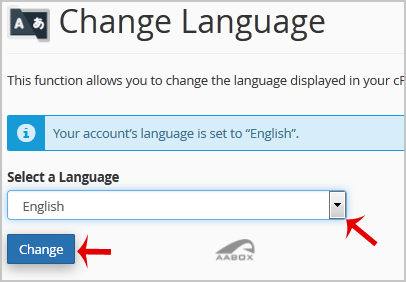
From the cPanel Language Configuration Page, chose your language from the dropdown menu and then click on the "
Change
" button.
Your cPanel language has been successfully changed.
Share via
Related Articles
How to change PHP version on your domain using cPanel?
How to change the password of your email account?
How to Change Your VPS OS Root/Admin Password Using SolusVM?
Categories
4
Backup/Restore
24
cPanel - Control Panel
11
Databases
6
DNS - Nameserver
10
Domain Management
11
Email
6
— Mozilla Thunderbird
9
FTP
5
— FileZilla Client
6
Installing a Control Panel
8
Mail Filters & SPAM
11
Mobile
7
— Android
4
— iOS/Apple
3
Others
10
Security
60
SiteWorx (Control Panel)
2
— Backup/Restore
4
— Domain Management
6
— Email
2
— FTP
3
— Others
4
— Security
7
— SiteWorx Basic
32
— Softaculous
15
—— Blog
2
—— CMS/Portal
13
—— Forum
79
Softaculous (cPanel)
17
— Blog
45
— CMS/Portal
15
— Forum
19
SolusVM
6
— SolusVM Basic
13
— SolusVM VPS Management
5
SSL (cPanel)
17
Wordpress
7
Legal/Terms
© AABox Helpdesk: Managed Business Systems
English