Back to website
Login
Home
Login
Register
Back to website
There was a problem loading the comments.
How to Delete "User Level Email Filter" in cPanel?
Support Portal
»
Knowledgebase
» Viewing Article
Print
06/19/2019 8:39 AM
Mail Filters & SPAM
1.
Log into your cPanel account.
2.
In the "
Email
" section, click on "
Email Filters
" Icon.
3.
Under "
Filters by Users
" You can see all of your existing email accounts, Click on "
Manage Filters
" next to the appropriate one.
4.
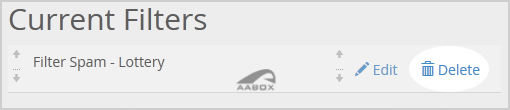
Under "
Current Filters
" You can see all of your existing filters, Click on "
Delete
" next to the appropriate one.
5.
Click on the "
Delete
" button.
6.
Now click on the "
Delete Filter
" button to remove your filter.
Share via
Related Articles
How to Create "User Level Email Filter" in cPanel?
How to Edit "User Level Email Filter" in cPanel?
How to Edit or Delete Cronjob via cPanel?
Categories
4
Backup/Restore
24
cPanel - Control Panel
11
Databases
6
DNS - Nameserver
10
Domain Management
11
Email
6
— Mozilla Thunderbird
9
FTP
5
— FileZilla Client
6
Installing a Control Panel
8
Mail Filters & SPAM
11
Mobile
7
— Android
4
— iOS/Apple
3
Others
10
Security
60
SiteWorx (Control Panel)
2
— Backup/Restore
4
— Domain Management
6
— Email
2
— FTP
3
— Others
4
— Security
7
— SiteWorx Basic
32
— Softaculous
15
—— Blog
2
—— CMS/Portal
13
—— Forum
79
Softaculous (cPanel)
17
— Blog
45
— CMS/Portal
15
— Forum
19
SolusVM
6
— SolusVM Basic
13
— SolusVM VPS Management
5
SSL (cPanel)
17
Wordpress
7
Legal/Terms
© AABox Helpdesk: Managed Business Systems
English