Back to website
Login
Home
Login
Register
Back to website
There was a problem loading the comments.
How to Remove Domain Redirect in cPanel?
Support Portal
»
Knowledgebase
» Viewing Article
Print
06/19/2019 6:48 AM
Domain Management
1.
Log into your cPanel account.
2.
In the "
Domains
" section, click on "
Redirects
" Icon.
3.
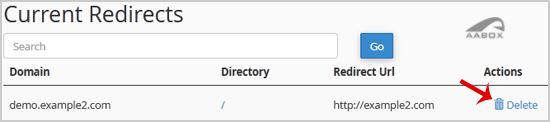
Scroll down to the end of page and under "
Current Redirects
" locate the domain and click on the "
remove
" icon.
4.
For confirmation click on the "
Remove Redirect
" button once more.
Share via
Related Articles
How to Redirect your website to any page or external domain?
How to Redirect an Add-on Domain?
How to Remove Parked Domain name in cPanel?
Categories
4
Backup/Restore
24
cPanel - Control Panel
11
Databases
6
DNS - Nameserver
10
Domain Management
11
Email
6
— Mozilla Thunderbird
9
FTP
5
— FileZilla Client
6
Installing a Control Panel
8
Mail Filters & SPAM
11
Mobile
7
— Android
4
— iOS/Apple
3
Others
10
Security
60
SiteWorx (Control Panel)
2
— Backup/Restore
4
— Domain Management
6
— Email
2
— FTP
3
— Others
4
— Security
7
— SiteWorx Basic
32
— Softaculous
15
—— Blog
2
—— CMS/Portal
13
—— Forum
79
Softaculous (cPanel)
17
— Blog
45
— CMS/Portal
15
— Forum
19
SolusVM
6
— SolusVM Basic
13
— SolusVM VPS Management
5
SSL (cPanel)
17
Wordpress
7
Legal/Terms
© AABox Helpdesk: Managed Business Systems
English